Pink 3D Christmas Ornaments Digital Paper: A Practical Guide to Selection and Application
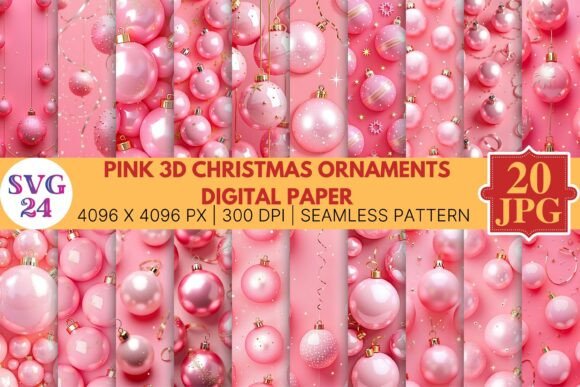
The aesthetic of pink 3D Christmas ornaments digital paper has carved out a unique niche in the world of seasonal design. Moving away from traditional reds and greens, this specific visual style offers a soft, modern, and often whimsical alternative that appeals to contemporary creators. Whether you are designing greeting cards, scrapbooking layouts, social media graphics, or printable gift tags, the dimensional quality of these assets adds immediate depth and texture to flat projects. However, the term "digital paper" can be somewhat misleading when applied to 3D-rendered imagery, leading to frequent usability issues for both beginners and experienced designers.
Understanding exactly what you are downloading is the first step toward successful project execution. True digital paper is typically a seamless, repeating pattern designed for tiling across large surfaces. In contrast, many files marketed as pink 3D ornament digital paper are actually high-resolution compositions of individual rendered objects placed on a solid or textured background. These are not always seamless. Confusing a standalone composition with a tileable pattern is one of the most common frustrations in digital crafting. If your goal is to create a continuous wrapping paper design or a large-scale backdrop, a non-seamless file will result in visible grid lines and disjointed visuals when tiled. Always verify the product description for terms like "seamless," "tileable," or "repeating pattern" before purchasing if continuity is required for your project.
Resolution and Print Quality Misconceptions
A significant error occurs when creators assume that a file labeled "high resolution" is automatically suitable for their specific output method. In the realm of 3D renders, pixel dimensions matter far more than marketing adjectives. For professional printing or high-quality home crafts, you generally need a minimum of 300 DPI (dots per inch) at the intended print size. A 3600x3600 pixel square image is excellent for a 12x12 inch scrapbook page, but it will appear pixelated and soft if stretched to cover an 18x24 inch poster.
Before integrating pink 3D Christmas ornaments digital paper into a print project, open the file properties to confirm the actual pixel count. Do not rely solely on the thumbnail preview in the marketplace, as these are often compressed web versions. If you plan to use the asset for web-only purposes, such as Instagram stories or blog headers, a lower resolution (72-96 DPI) is acceptable and will load faster. Using massive print-ready files for web design slows down page speed without providing any visual benefit. Conversely, attempting to upscale a low-resolution web graphic for print results in artificial sharpening artifacts that ruin the smooth, plastic-like sheen characteristic of 3D ornament renders. Matching the file specifications to your end medium prevents wasted ink, paper, and time.
Navigating Color Profiles and Screen Calibration
Pink is notoriously difficult to reproduce accurately across different devices and print methods. Digital screens display color using RGB light, while printers use CMYK ink. A vibrant, neon bubblegum pink that looks stunning on a calibrated monitor may print as a dull magenta or muddy rose if the color profile is ignored. Many digital papers are delivered in RGB format because they originate from 3D rendering software optimized for screen display.
To avoid color disappointment, perform a test print before committing to a full production run. If you are sending designs to a professional printer, ask about their preferred color profile and whether they handle RGB-to-CMYK conversion internally. For home printing, understand that your printer’s ink set and paper type dramatically influence pink tones. Glossy paper tends to make pinks appear more saturated and vibrant, while matte or watercolor paper absorbs ink and creates a softer, pastel effect. Adjusting your expectations based on the physical substrate is just as important as the digital file itself. Relying solely on screen appearance without accounting for output variables is a primary cause of dissatisfaction with pink-themed holiday projects.
Licensing and Commercial Usage Boundaries
Beyond technical specifications, licensing remains a critical area where well-intentioned creators inadvertently make poor decisions. The allure of beautiful pink 3D ornament assets can sometimes overshadow the legal terms of use. Not all digital papers grant the same rights. Some licenses permit personal use only, while others allow for limited commercial application, such as selling physical products made with the paper. Fewer still allow for the resale of the digital file itself or its inclusion in digital templates for sale.
Misunderstanding these distinctions can jeopardize small businesses and freelance careers. If you intend to use pink 3D Christmas ornaments digital paper in products for Etsy, Shopify, or client work, read the license agreement thoroughly. Look for specific clauses regarding "end products," "print-on-demand," and "digital redistribution." Assuming that purchasing a file grants unlimited commercial rights is a risky oversight. When in doubt, contact the designer directly for clarification. Respecting intellectual property not only protects your business legally but also supports the ecosystem of digital artists who create these specialized assets. Clear understanding of usage rights ensures your creative endeavors remain sustainable and ethical.
Design Integration and Visual Balance
Even with the correct file, proper resolution, and valid license, the final result depends on thoughtful design integration. Pink 3D ornaments are visually heavy elements due to their shading, highlights, and dimensionality. Placing text directly over these detailed areas often compromises readability. A common mistake is treating this digital paper as a uniform background rather than a collection of distinct focal points.
Instead of fighting the complexity of the render, work with it. Utilize negative space between the ornaments for typography or overlay a semi-transparent white or dark layer to create contrast where text is needed. Consider the mood you wish to convey; hot pinks suggest energy and playfulness, while dusty roses evoke vintage elegance. Pairing the wrong font style with the specific shade of pink can create visual dissonance. Script fonts generally complement the roundness of 3D ornaments, whereas rigid geometric typefaces might clash unless intentionally aiming for a retro-modern aesthetic. Testing multiple layout variations helps identify the most harmonious balance between the ornate digital paper and your added content.
- Verify Seamlessness: Confirm if the file is truly tileable or a fixed composition before starting large-format projects.
- Check Pixel Dimensions: Ensure the resolution matches your print size requirements to avoid blurriness.
- Test Print Colors: Never trust screen colors implicitly for pink tones; always run a physical sample.
- Read License Terms: Distinguish clearly between personal, commercial, and digital redistribution rights.
- Respect Visual Weight: Use overlays or negative space to maintain text legibility over detailed 3D renders.
Selecting and utilizing pink 3D Christmas ornaments digital paper successfully requires a blend of technical diligence and artistic sensitivity. By approaching these assets with informed scrutiny rather than impulsive enthusiasm, creators can avoid the pitfalls that lead to subpar results. The goal is to leverage the unique charm of this digital medium to enhance your work, ensuring that every ornament, shadow, and highlight serves a purposeful role in your final creation. Taking the extra moments to validate files, test outputs, and respect usage terms ultimately saves resources and elevates the professional quality of your holiday designs.